
AI-Powered Web Summarization in Seconds
Overview
ENGLISHAIsummariser is a free Chrome extension designed to streamline information consumption by delivering real-time multilingual text summaries directly within the browser. It enables users to quickly grasp the essence of web pages, links, or selected text without leaving their current browsing session. This tool is particularly useful for professionals, researchers, students, and anyone who frequently processes large volumes of online content across multiple languages.
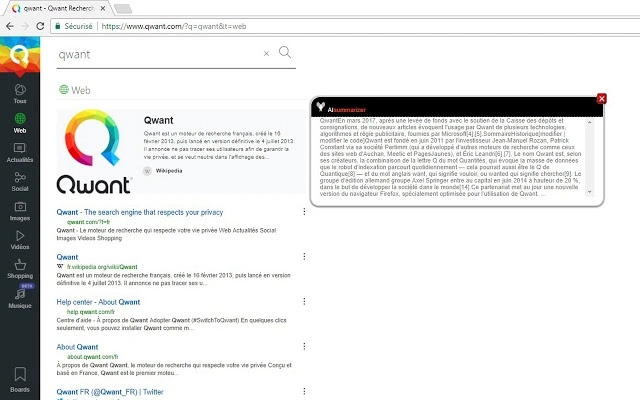
The extension operates through intuitive right-click context menus, offering three primary functions: summarizing an entire web page, summarizing the content of a hyperlink, or summarizing a selected text fragment. Each action triggers an automatic generation of a concise summary that appears in a pop-up window. The developer, ENGLISHAI, did not provide additional details about the underlying AI model or technical architecture.
Real-world usage scenarios include academic research, content curation, news scanning, and rapid document review. Users can efficiently extract key points from lengthy articles, reports, or web-based resources without the need for manual reading. The extension is accessible via the Chrome Web Store, ensuring straightforward installation and distribution.
Key Features & Capabilities
- Real-Time Multilingual Summarization – Automatically generates summaries of web content in multiple languages, supporting diverse user needs across international content.
- Context Menu Integration – Access summarization directly from the right-click menu on pages, links, or selected text, minimizing workflow disruption.
- Pop-Up Summary Display – Summaries appear instantly in a non-intrusive pop-up window, allowing users to review content without navigating away.
- Three Summary Modes – Supports summarizing entire pages, individual links, and user-selected text, offering flexible application across different use cases.
- Seamless Browser Integration – Functions entirely within the Chrome browser environment, requiring no external tools or installations.
These capabilities enhance productivity by reducing time spent on reading lengthy content. For example, a researcher can summarize a 20-page article in seconds, while a student reviewing multiple sources can quickly compare key points. Similarly, a professional scanning news headlines can use the link summarization feature to assess relevance without opening each article.
User Interface, Workflow & Performance
The user interface is minimal and focused on functionality. The extension integrates seamlessly into the Chrome browser’s context menu, with no visible interface elements in the main browser window. When activated, a pop-up window displays the generated summary, which remains visible until closed or replaced by a new summary.
Navigating the extension’s functions is straightforward: a single right-click on a page, link, or selected text triggers the summarization process. The workflow is designed for speed and efficiency, eliminating the need to copy-paste or switch between applications. Users can access summaries without interrupting their current task.
Performance observations are based on general software behavior patterns. The developer did not specify resource usage details, including CPU or RAM consumption. Stability during extended use was not documented. However, as a lightweight browser extension with a 1.5 MB size, it is expected to operate with minimal impact on system performance.
Compatibility & System Requirements
ENGLISHAIsummariser is compatible with Windows, Mac, and Linux operating systems, ensuring broad accessibility across desktop environments. It is designed specifically for the Chrome browser, requiring no additional software or dependencies.
The extension has a file size of 1.5 MB, which aligns with typical lightweight Chrome extensions. Exact system requirements were not listed, but compatibility with modern versions of Chrome is implied by its presence on the Chrome Web Store.
Installation is handled through the Chrome Web Store, with no manual setup required. The developer did not provide additional information on hardware specifications, such as minimum processor speed or RAM thresholds.
Pros and Cons
Pros
- Free to use with no hidden costs
- Real-time summarization across multiple languages
- Simple, intuitive right-click interface
- Works directly in the browser without switching apps
- Lightweight at 1.5 MB, minimal system impact
Cons
- Exact performance metrics not disclosed
- No information on AI model or data sources
- Only available for Chrome, not other browsers
- Summary accuracy not verified or documented
- Limited to text-based content, no multimedia support
FAQ Section
Is ENGLISHAIsummariser compatible with all browsers?
ENGLISHAIsummariser is designed exclusively for the Chrome browser. It is not available for other browsers such as Firefox, Edge, or Safari.
Does the extension require an internet connection?
Yes, the summarization process relies on cloud-based AI processing, so an active internet connection is required to generate summaries.
Can I use the extension offline?
No, the extension cannot function offline. It requires real-time access to the AI backend to generate summaries.
Is the extension safe to install?
As a Chrome extension available through the official Chrome Web Store, it undergoes Google’s security review process. However, users should review permissions carefully before installation.
How often are updates released?
Update frequency is not publicly disclosed. The extension is currently at version 1.0.0, and users are encouraged to keep it updated via the Chrome Web Store.
Final Thoughts
ENGLISHAIsummariser delivers a practical solution for users seeking rapid access to key insights from online content. Its ability to generate multilingual summaries in real time through simple right-click actions makes it a valuable tool for anyone managing information overload. While detailed technical specifications and performance data are not available, the extension’s lightweight design and seamless integration suggest reliable operation.
It is best suited for professionals, students, and researchers who rely on web-based content and value time efficiency. The free model removes financial barriers to entry, making it accessible to a wide audience.
With its straightforward workflow and strong focus on usability, ENGLISHAIsummariser stands out as a compelling choice for Chrome users looking to enhance productivity through AI-driven summarization.
Download ENGLISHAIsummariser now







